
Give the gift of wellness — redeemable for any service, anytime.
Click on this link below to go to the Buy Gift Card page
https://bodyfirstwc.janeapp.com/online_gift_cards/new
Here’s a short video tutorial
https://youtube.com/shorts/EHqruQw6v_g?si=Wk-gHhXM_8UjD79a
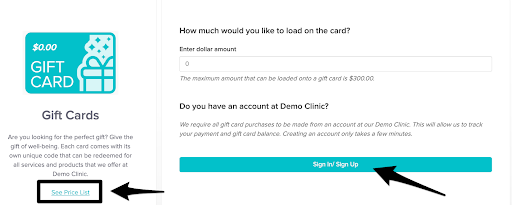
You’ll land on the page where you can view the full price list of services available for online booking. If the service prices shown don’t include tax, you’ll see the service subtotal — this helps you decide how much to load onto the gift card, especially if you’re gifting a specific treatment.
From here, you can sign in to your account or create a new one if you haven’t logged in yet.
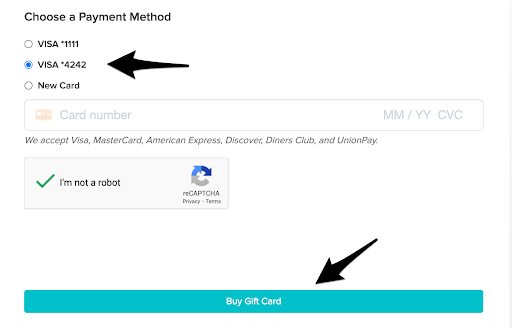
Once signed in, choose any of your stored payment methods or add a new card, then click “Buy Gift Card.”
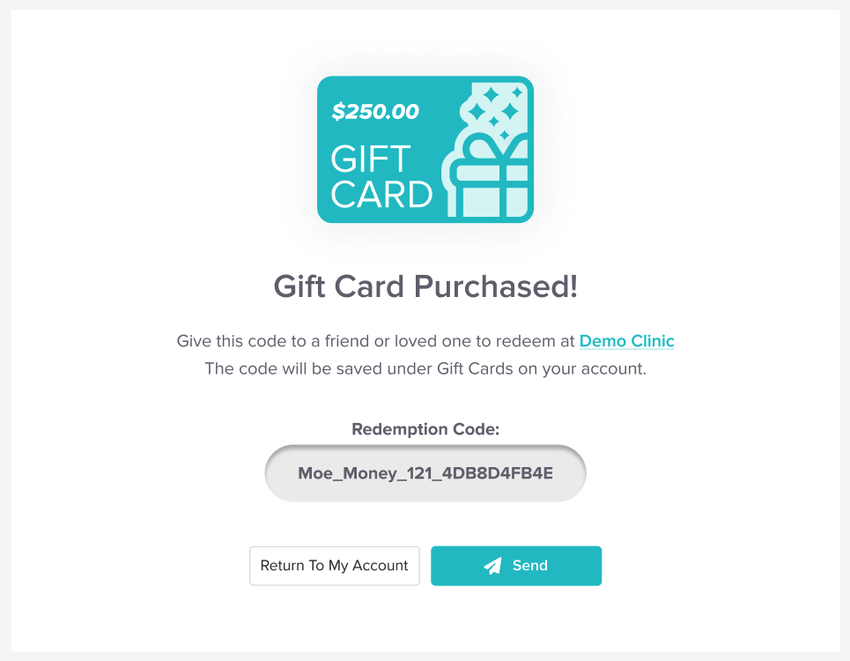
On the final screen, you’ll receive your Gift Card code, which you can give directly to the recipient. You can also click the “Send” button to open your default email app with a pre-filled message that you can edit before sending.
Click on this link to know how to use the gift card once it’s purchased.
https://jane.app/guide/redeeming-a-gift-card